Friday, December 15, 2017

Updated camera app shows possible Nokia 9 features

Nokia opened Beta Labs for the Nokia 5 earlier this week. That one arrived with a newer version of the default camera app. It should be like any other ordinary app update but its UI is said to be similar to the China-exclusive Nokia 7 phone. What's more interesting about this updated app are the features sighted within the APK package.

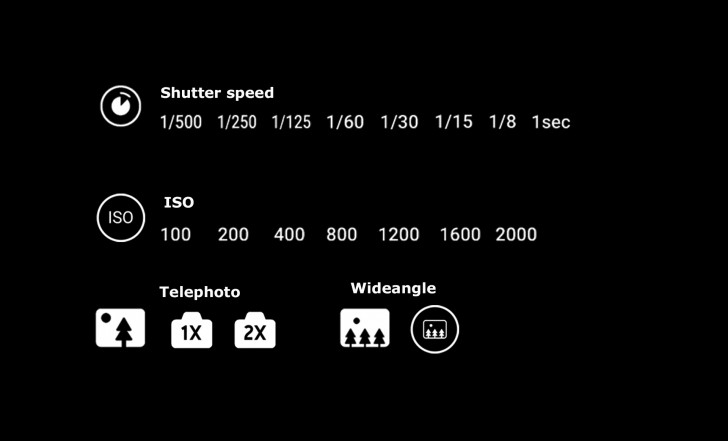
The latest Nokia Camera app now boasts a 2x optical zoom on telephoto camera mode. There's also a wide-angle mode plus new shutter speed icons and ISO settings. Note some of the features may not be readily available on specific models, especially the Nokia 5, but the higher-specced models could have these.

We only have speculations at the moment. Until HMD and Nokia make an official announcement or feature, take everything with a pinch of salt. The Nokia Camera APK shows the wide angle and telephoto camera support which could also mean the next Nokia phone may have a secondary wide-angle sensor. If not a new sensor then probably a more powerful camera hardware.

We can expect the Nokia 9 will be unveiled next month in China. It may also be shown off at the Mobile World Congress the following month before its global launch.

VIA: Nokiamob


Source: Updated camera app shows possible Nokia 9 features

Thursday, December 14, 2017

New Nokia Camera app teardown reveals Nokia 9 may sport telephoto, wide-angle camera

The new camera app has hidden features like a telephoto camera mode and it also sports a wide-angle mode. Based on new features, the Nokia 9 is expected to come with a telephoto and a wide-angle camera setup.

The new Nokia Camera app on the Nokia 5 smartphone reveals that the upcoming Nokia 9 smartphone will feature a telephoto and a wide-angle camera lens. HMD Global recently started rolling out Android Oreo beta build for the Nokia 5 smartphone. Nokiamobdug around in the new camera app's code on the Oreo beta and discovered that apart from a new simplified UI, it supports telephoto camera mode with 2X optical zoom and also features a wide-angle mode. 

Nokia Camera v8.0200.20 app also comes with additional icons for controlling shutter speed. Users can control shutter speeds between 1/500s and 1s along with the ISO option (100-2000). However, the new features cannot be accessed in the current app version. The report says it's due to the hardware limitations related to telephoto and wide-angle modes and also because the features aren't ready yet. Other Nokia smartphones like the upcoming Nokia 9 or the Nokia 8 2018 edition could come with a wider range of ISO and shutter speed settings and might also sport some new settings.

Going by the above information, the upcoming Nokia 9 is speculated to sport a dual camera setup with one telephoto and another wide angle lens. The smartphone is expected to feature a thin-bezel design with a fingerprint sensor on a glass back. It could feature a 5.5-inch AMOLED QHD dual-curved display and is speculated to be powered by Qualcomm Snapdragon 835 SoC with 6GB of RAM. 

The Nokia 9 is also expected to be IP67 water and dust resistant and a previous report suggests that the smartphone will be priced at 3699 Yuan (Rs 37,000 approx directly converted) for the 6GB RAM/64GB ROM model and 4199 Yuan (Rs 42,000 approx directly converted) for the 6GB RAM/128GB storage variant.

Digit NewsDeskDigit NewsDesk  news@digit.in

The guy who answered the question 'What are you doing?' with 'Nothing'.

Other Popular Deals
  • Swipe Elite 3- 4G with...

  • Lenovo Z2 Plus (Black, 32GB)

  • Lenovo Z2 Plus (Black, 32 GB)(3...

  • Interesting Galleries Best camera phones under Rs....
  • Best smartphones to buy under Rs. 7,000 in India right now

    14 upcoming mobile phones you should expect in India in 2016

  • 10 smartphone sequels to look forward to in 2015

    10 best smartphones between Rs. 10,000 to Rs. 20,000...

  • Best smartphones under Rs. 15,000 with great battery backup

    26 upcoming & latest smartphones to check-out

  • Slimmest phones you can buy in India [November 2015]

    The best upgrade options for 10 classic smartphones

  • Huawei P8: First Look

    Xiaomi Mi4i vs Asus Zenfone 2 (2GB): Quick Comparison

  • LG G4: First Look

    Asus Zenfone 2 and Zenfone Selfie: In Pictures

  • Sony's current & upcoming Xperia phones: An Overview

    Micromax Canvas Sliver 5: First Look

  • Sony Xperia C4: First Look

    Coolpad Dazen X7 and Dazen 1: In pictures


  • Source: New Nokia Camera app teardown reveals Nokia 9 may sport telephoto, wide-angle camera

    Wednesday, December 13, 2017

    Nokia camera app gets telephoto and wide-angle support ahead of Nokia 9 launch

    The Oreo beta for the Nokia 5 brought a new version of Nokia's camera app – with surprising (and hidden) new features. The camera now supports dual cameras of both the telephoto and wide-angle kind.

    The app specifically shows 2x telephoto zoom, which is the standard for phones right now. The Nokia 5 can't make use of it of course, even HMD's only dual camera phone – the Nokia 8 – has a identical field of view on its two cameras. But this app shows what could come in the future.

    Nokia camera app gains support for telephoto and wide-angle dual cameras

    So far no phone on the market does both telephoto and wide-angle. We've already heard the first murmurs of phones with three cameras but chances are that HMD is just considering two separate models. All Nokia 9 rumors so far point to a two-camera solution.

    There's another less exciting change to the camera app – you can now manually select Shutter speed and ISO on the Nokia 5. Values go between 1/500s and 1s for the shutter and 100 to 2,000 for ISO.

    Source


    Source: Nokia camera app gets telephoto and wide-angle support ahead of Nokia 9 launch

    Tuesday, December 12, 2017

    How to use the Essential PH-1 Manual Camera app to take better photos

    essentialcamerahero.jpg

    Image: Jack Wallen

    I recently purchased an Essential PH-1, and have loved the device since first use. It's a rock solid build on both the hardware and software fronts. It's beautiful and performs as well as any flagship phone I've touched and at a fraction of the cost.

    However, the camera app is the one Achilles heel for the device. Although it's improved dramatically since first release (to the point that it's actually a useable app now), it doesn't quite stand up to the competition.

    Fear not, people are on this—especially the Essential developers. In fact, it has been reported a developer discovered the Google Camera HDR+ Port work fantastically on the Essential. I was close to pulling the trigger on that, but the app isn't available from the Google Play Store and I've grown hesitant to point anyone to sideloading Android apps these days.

    Because...malware.

    Which brings us back to dealing with a less-than-stellar camera experience on the device. Though I love the PH-1, I wasn't going to settle for software that didn't live up to the hardware's promise. With that in mind, I set out to solve that weak spot for the Essential PH-1.

    I believe I've found the easy fix.

    What is this easy fix you speak of?

    First off, you have to understand that photos are all very subjective, and that one person's art is another person's trash. I will also preface this by saying that while the solution is actually quite simple, achieving quality results does require a bit of understanding. To be specific, you need to have a basic understanding of some of the particulars of cameras. To make this easy, I've explained what you need to know in layman's terms.

  • Shutter Speed: How long your camera's shutter stays open. This is typically listed as a fraction or a whole number.
  • Aperture (or F Stop): Controls how much light hits your camera sensor and how much of your image is in focus.
  • ISO: Your camera sensor's light sensitivity. The higher you set the ISO, the more sensitive your camera will be to light, which in the wrong conditions can lead to grainier images.
  • White Balance: The adjustment of making white objects actually appear white (as rendered in your photos).
  • Understanding those four elements will go a long way in helping you achieve better images because the fix for the Essential PH-1 requires you to install Manual Camera from the Google Play Store. This app isn't free, but the $2.99 price is well worth paying for this app. In fact, I would go so far as to say that Manual Camera is the best camera app on the market. Although it doesn't include a bunch of filters to give your subjects ears, frames, or squeaky-high voices, Manual Camera does one thing very well—take great photos. It does this by allowing you to actually adjust various settings (such as ISO, Shutter Speed, etc.). If your job depends on taking quality images, especially in variable conditions, this is the app you want.

    Installation

    The installation of the app is very simple:

  • Open the Google Play Store on your device
  • Search for manual camera
  • Locate and tap the entry by Geeky Devs Studio
  • Tap the price button
  • If necessary, authenticate your Google Account and tap Buy
  • Allow the installation to complete
  • You will now find a launcher in your App Drawer, your home screen, or both. Tap the icon to open Manual Camera. For those who are used to just launching their cameras and snapping photos, Manual Camera will have a bit of a learning curve. I highly suggest you walk through the introduction and take note of each step. These will be important items in your journey to getting the best possible photos from your PH-1. I'm not going to go into the how to of taking photos with Manual Camera (as there's quite a bit to learn and the interface takes some time to get used to—Figure A).

    Figure A

    Figure A

    Figure A

    The Manual Camera interface.

    The gist of the interface is you tap and hold a setting (on the left side of the window) and use the scroll the wheel (on the bottom right side of the window) to make adjustments. Once you have the settings perfect for the environment, snap the photo.

    I took photos of the same object in the same light. And made adjustments with Manual Camera to demonstrate how you can get the most out of the PH-1 camera hardware. Although these aren't perfect photos, they illustrate my point (Figure B).

    Figure B

    Figure B

    Figure B

    The Manual Camera photo is on the right.

    The first thing that should jump out is that the image taken by Manual Camera (on the right) displays the table top as actually white, whereas the PH-1 Camera app shows the table as slightly grey. The Manual Camera captured a more true-to-life representation.

    The easy fix

    And that's it—the fix you need for the PH-1 camera issue. Although you do have to understand a bit more about taking photos, if you're looking to get the most out of the camera and don't want to wait for Essential to perfect their camera app, Manual Camera is a great solution. Once you get used to using Manual Camera, you won't want to go back to camera apps that don't give you the same level of control over your photos.

    Happy snapping!

    Also see
    Source: How to use the Essential PH-1 Manual Camera app to take better photos

    Monday, December 11, 2017

    retro gudak camera app brings analog photography to your smartphone

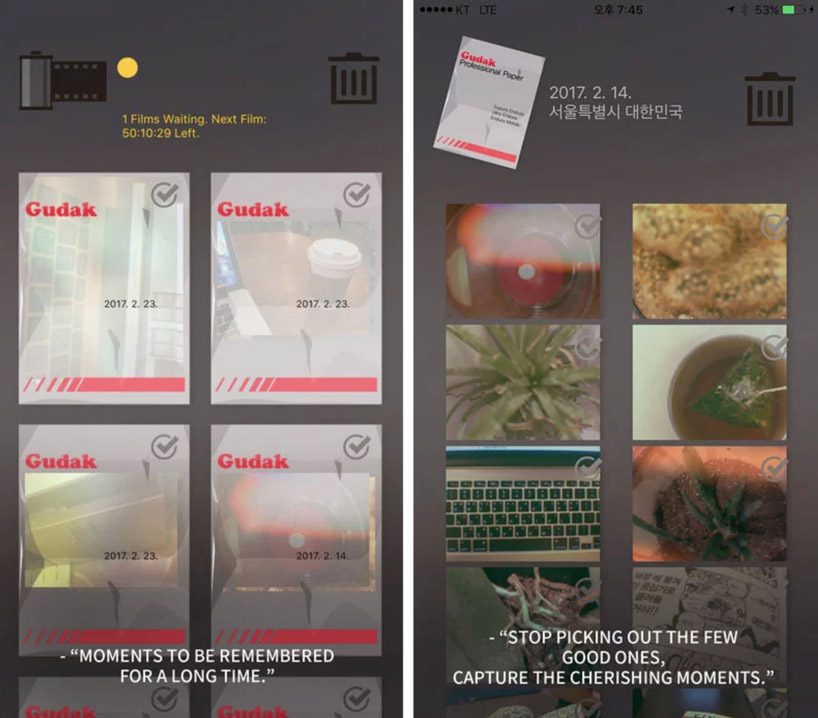
    in today's digital era of instantaneous gratification, capturing images has never been easier. forget having to wait several days to develop your film; just point and shoot! however, photographers worldwide still swear by analog photography and the 'art of waiting'. back in 2016, korean company screw bar had developed an app 'gudak' designed to focus on eastman kodak's kodak moments. as an homage to analog photography, the team eliminated the 'instant review' feature of conventional digital cameras by reducing 95% of the conventional viewfinder feature.

    the gudak camera app is available from the iTunes store for $0.99
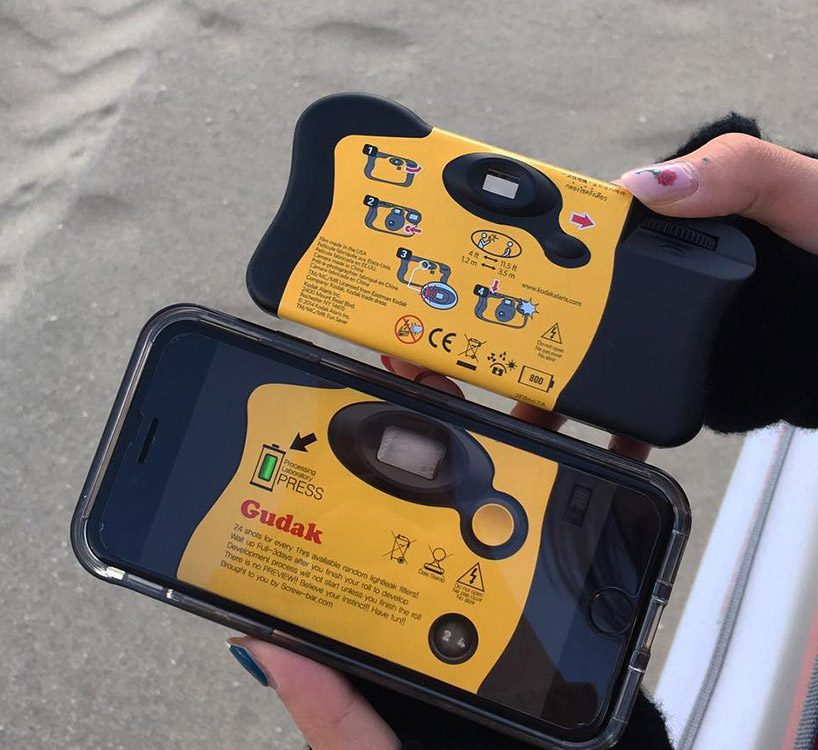
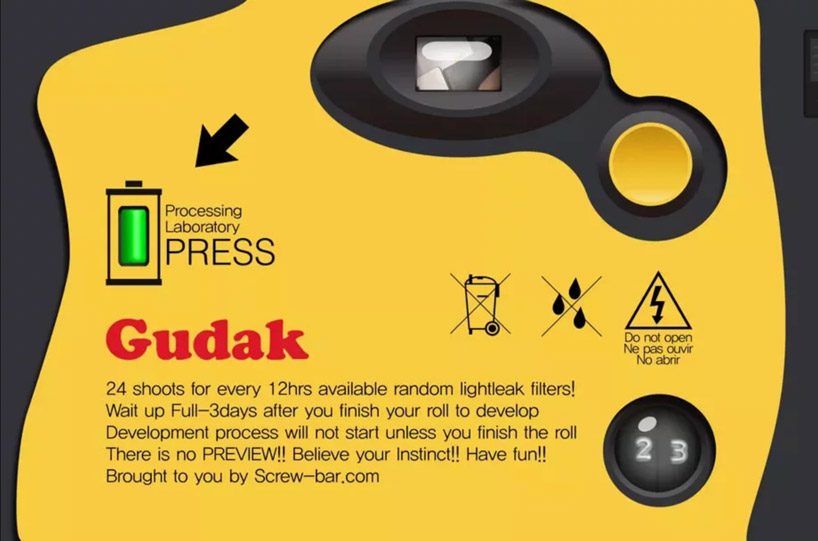
    the retro gudak cam, an old korean term for 'outdated', features 24 shots per film roll and requires a waiting period of an hour to reload the film. once you finish the roll, you have to wait three full days for the development processing to view the photos. 'this app is definitely for a niche market,' a user comments. 'to begin with I shoot film, so the 3-day waiting period is actually exciting to me and I don't mind that at all. it actually simulates the fun and excitement for shooting film pretty nicely. and unlike some people I enjoy the random light leak as well.'

    side-by-side comparison by instagram user euniceyo0n
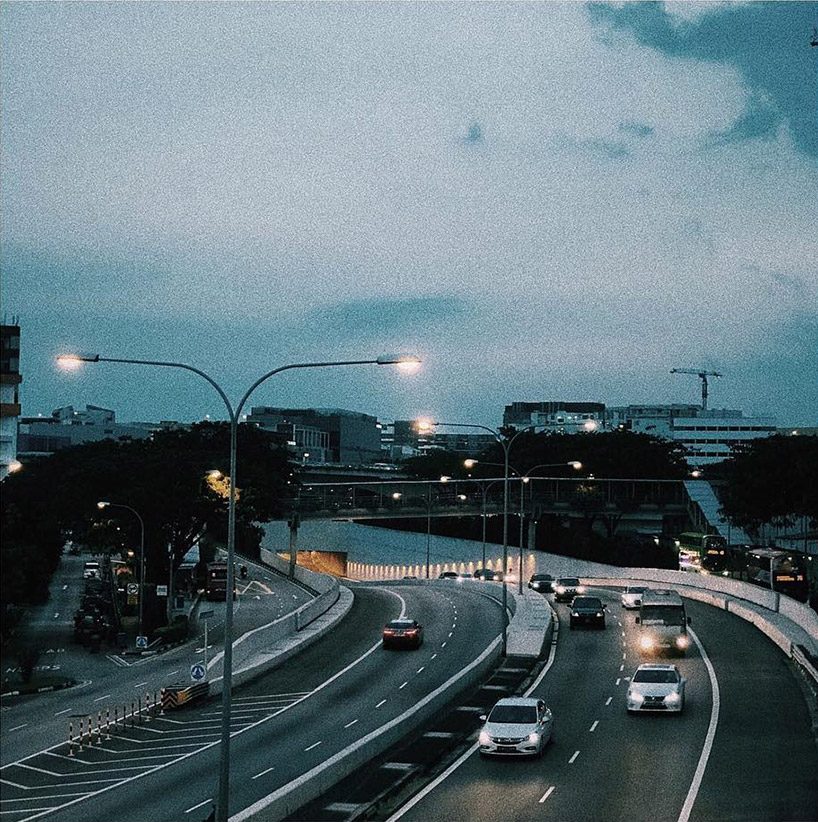
    users can choose from a variety of retro-looking filters

    image by instagram user qiguguer

    image by instagram user sansfaces


    Source: retro gudak camera app brings analog photography to your smartphone

    Sunday, December 10, 2017

    This camera app requires users to wait three days for pictures to ‘develop’

    Thanks to the convenience of smartphones, snapping photos has become second nature. Anyone can grab a phone and take as many pics as they want. Even more convenient is the fact that you can instantly see what the photos look like. If you took a bad one, you just delete it and move on. However, as strange as it might sound, there's an increasingly popular app that mimics the use of old film cameras by making you wait three days to "develop" your photos.

    The 99-cent app is called Gudak Cam and has become very popular in South Korea and Japan, especially among high school girls. The app came out earlier this year, and is meant to simulate the look and feel of using a Kodak disposable camera (remember those?). The app requires you to fill up a "roll of film," which contains 24 shots. Once you've finished with that roll, you can have it developed in a process that takes three days, at the end of which you can view the photos on your phone.

    With Gudak Cam, you will also have to wait several hours before you can add a new roll of film to your virtual camera.

    All of this may sound incredibly inconvenient and, to a large extent, it is. However, the appeal of Gudak Cam lies in the fact that it forces users to slow down and really think about each shot. Rather than snapping half a dozen pictures and only keeping one, the idea is that users will slow take a handful of really good pictures that are worth keeping.

    Beyond that, the app's aesthetics do a lot to help explain its appeal. Once the app is active, an image reminiscent of Kodak disposables fills the screen, giving you the feeling that you're truly holding one of these ancient devices. Even the method to shoot photos is changed — you have to use the app's small viewfinder. All of this combines to create an experience that is quite different from using the standard camera app on a smartphone.

    Whether Gudak is just a passing fad or the start of something bigger remains to be seen. However, it already has more than 1.3 million users, so it seems to be doing something right.

    That being said, if you want something more modern than check out our list of best cameras of 2017 or the best camera phones if you prefer something smaller.

    Don't Miss

    The best cheap phones you can buy

    Up Next

    Here's how your favorite crusaders roll: The top 10 superhero cars


    Source: This camera app requires users to wait three days for pictures to 'develop'

    Friday, December 8, 2017

    Essential Camera app update v0.1.091 brings YouTube live 360 support and broadcast ability for Facebook Live 360

    Essential has released another update to improve the camera performance and add more features to the Essential Phone PH-1. The new update is available via the Play Store, and if you should also receive the update notification.

    In this new update, which takes the version number to 0.1.091, you will get new features such as support for YouTube Live 360. Apart from that, you can now also directly stream Facebook Live 360 videos to Facebook.

    That's about all the new features that this update will add to the existing camera. Essential previously released an update that brought features such as Portrait mode, and reduced JPEG compression. The company is working hard to improve the camera performance, which was one its main lacking features.

    Download Essential Phone Oreo beta update

    The Essential PH-1 is a pretty good phone, specially now that the price has permanently cut down. You get the latest hardware, a dual camera support, and fast software updates. It's already got the December Android security update as well.

    The company also released a software update for the Essential 360 Camera, which improves the JPEG quality, image stitching, and stability. This update will be available once you connect the camera to your phone, as build NNJ41C.

    Download Essential Camera from Play Store
    Source: Essential Camera app update v0.1.091 brings YouTube live 360 support and broadcast ability for Facebook Live 360